


For years, developers have wondered: will Unreal Engine truly support running games directly in the browser? With the rise of WebAssembly (WASM) and the new WebGPU graphics API, the idea of playing high-quality games in a web browser—without plugins or cloud streaming—feels closer than ever. But where does Epic Games stand, and what options do developers have right now?

Unreal Engine and the Browser: A Short History
Unreal Engine actually did support the browser in the past.
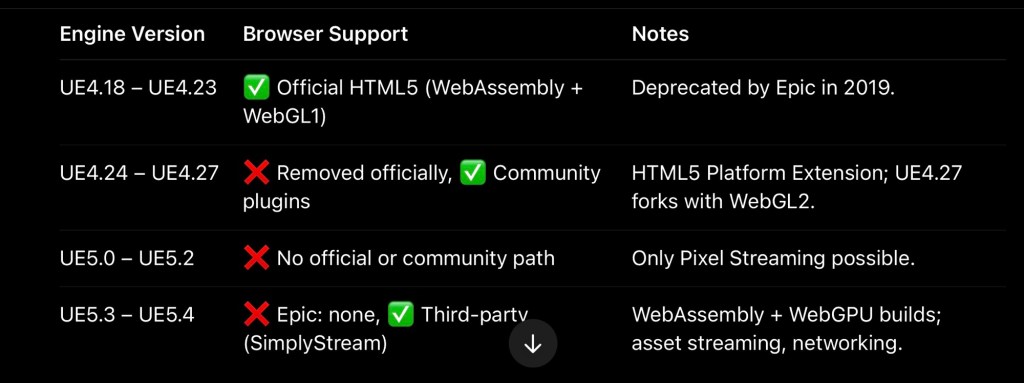
UE4.18 – UE4.23: Epic shipped an HTML5 export target powered by Emscripten. Games could be compiled to WebAssembly and run with WebGL 1. UE4.24 onwards: Epic officially removed HTML5 support from the engine due to low adoption and technical challenges【Epic Docs】.
Developers who wanted to stick with the browser had to rely on the community-maintained HTML5 Platform Extension, which extended support through UE4.27【GitHub – UnrealEngineHTML5】.
Since Unreal Engine 5, no HTML5/WebAssembly target exists in the official engine. Epic’s recommended solution has been Pixel Streaming (rendering the game on a GPU server and streaming video to the browser) – but that is very different from native WASM execution【Epic Forums】.
Community and Third-Party Efforts
While Epic stepped back, the community stepped in.
1. HTML5 Extensions for UE4
Developers extended UE4.24–4.27 with working HTML5 support. Forks like SpeculativeCoder’s UE4.27 HTML5-ES3 added WebGL2 support and newer Emscripten versions【SpeculativeCoder UE4.27 Fork】.
2. Wonder Interactive / SimplyStream
A company called Wonder Interactive (later SimplyStream) revived UE’s browser support:
Added WebAssembly + WebGPU support for UE5.1–5.4【SimplyStream Announcement】. Demonstrated UE5’s Lyra demo running in Chrome with multithreading and near-native graphics. Built a pipeline for asset compression, async loading, and WebSockets networking【SimplyStream Docs】.
This makes UE5 browser deployment possible again – though through a third-party service rather than Epic itself.

Technical Deep Dive: WebAssembly and WebGPU
Running Unreal in a browser involves several layers:
WebAssembly (WASM): Compiles C++ game code into .wasm binaries executed at near-native speed. WebGL (Old Path): Equivalent to OpenGL ES2/ES3. Limited features, no compute shaders, heavy workarounds. WebGPU (New Path): Modern low-level graphics API similar to Vulkan/DX12/Metal. Supports compute shaders, multithreading, and efficient GPU memory access.
👉 With WebGPU, Unreal 5 games can finally use more of their modern rendering pipeline inside the browser. Features like Nanite remain challenging, but the gap is closing fast【WebGPU Spec】.
Current Status (2025)
Here’s a snapshot of where things stand:
Workarounds for Developers
If you want to target browsers with Unreal today:
UE4.27 + Community HTML5 Plugin – Stable but outdated. Good for simpler projects. UnrealEngineHTML5 Docs SimplyStream for UE5 – The modern path with WebGPU. SimplyStream Platform Pixel Streaming – If you need full-fidelity Unreal, but can handle server costs. Epic Docs – Pixel Streaming

Future Outlook
Epic Games has not announced any official return of WebAssembly/WebGPU support in UE5【Epic Forum Discussion】. Their focus remains on consoles, PC, and native mobile.
That said, with WebGPU maturing and community demand growing, it’s possible Epic could reconsider in the future. Engines like Unity and Godot already ship with official HTML5/Web export – Unreal may not want to lag behind forever.
For now, browser Unreal Engine development lives in the hands of the community and startups. If you’re a low-level dev, you can absolutely build UE games for the web – but you’ll need to choose between legacy forks, Pixel Streaming, or platforms like SimplyStream.
References
 Fps Io Games